Showing posts with label Search Strategies. Show all posts
Friday, January 13, 2017
Locating Mary's Grandfather
Have you ever thought about doing the genealogy of a place, as well as genealogy of a family. Think about the political map of Europe and the many changes over the centuries. Though an ancestor may have lived in one village throughout their life, the name of the country or duchy where they lived may have changed several times. Understanding boundary changes are essential to finding the records of our ancestors.
Mary's grandfather presents a perfect storm of the challenges in location research in early Virginia records. Fortunately, as of this writing, there is a wonderful resource for United States boundary changes at a website named MapOfUS.org. On this site you will find historical county formation maps for the contiguous 48 states. The maps use a program named AniMap, which is available for purchase from The GoldBug. I've owned a copy for many years and use it often. The Virginia images I show here are from AniMap, with a bit of coloring added by me.
The story starts with Mary Maddox Neff's mother, Elizabeth Greaton, who was born in Virginia about 1798. Her father, David Greaton, signed her marriage consent in Pickaway County, Ohio, in 1816. He filed a lawsuit there in 1810, so was no longer living in Virginia by that date. Yet Virginia location research cannot just stop in 1810, as you'll see.
What did Virginia look like in 1798? AniMap shows the combined Virginia and West Virginia, as it was a single state in 1798. Fortunately the western boundaries of Virginia had been set, so there is a western limit to this particular Virginia research.
The name David Greaton is fairly unusual and fortunately shows up in a few online records. Remember that online records are the tip of the iceberg. There may be many other records and other men, but the online records at least provide one place to start looking in the challenge to locate the man who is my ancestor.
David appears in the tax roll of Greenbrier County in 1785. We'll be focused on the blue area for this research. Greenbrier County is very large, so in reality, he could have been living anywhere in that county. Fortunately there is another clue that helps focus the search.
Since David must have reached at least 18, and likely 21, by 1785, he would have been born no later than 1767. If he was born in this area of Virginia (at this point unknown) where might his family have lived?
Have you seen the name Botetourt (pronounced Bot-a-tot) County? Oh, my, one of the big historical counties of western Virginia. It was carved out in 1770, so he could not have been born there. Let's go back further.
In 1761, Augusta was the mother county for all of western Virginia, with no boundary except the Pacific ocean and, realistically, the mountains.
Are you following so far? The Greaton research would start in Greenbrier and potentially track backwards through Botetourt and Augusta, as well as other counties. I will need to create a list in reverse county formation order before going on a field trip.
Now let's move forward in time. The name David Greaton (Grattan) appears in a head-of-household list in Bath County in 1791 and a marriage record is found in Bath County in 1792.
See the blue area? That small section of Bath County came from Greenbrier County. It is certainly possible that there was more than one David Greaton or that there was just one who moved. However, it is most likely that there was only one at that time and that he lived in the section of Greenbrier that became Bath. So research needs to include Bath and in fact will start there.
That area of land didn't stay in Bath County. In 1821, it was absorbed into Pocahontas County. Why would that matter? David Greaton was long gone by 1821, first to Ohio and then to Illinois.
The reasons to care about Pocahontas County are church records, cemeteries and possibly probate records. Assuming the Greaton family attended church within that area, that church is now in Pocahontas. If a sibling or parent died after that county change, the probate could be there. I would ignore Pocahontas at my own peril. Add that to the research list.
There are still more changes after 1821 that I need to be aware of. What happened in 1861? That's right, Virginia seceded from the Union and became the capital of the Confederate States of America. All those counties changed the nation to which they belonged.
And, of course, 1863 brought the next big change. 50 counties left Virginia and the Confederacy, forming the state of West Virginia and rejoining the Union.
The research list got a bit more complex. Greenbrier and Pocahontas are now in West Virginia. Archives will primarily be in Charleston, West Virginia, with some records in Richmond, Virginia. Due to the 1863 change, it is likely that county information will be found in federal records of both the Union and the Confederacy.
Bath, Botetourt and Augusta are in Virginia with archives in Richmond.
For anyone doing Virginia research, there is one more potential twist, though it doesn't affect this exercise. Here's a fairly modern map. All the yellow areas are independent cities that are no longer part of counties.
As you research your ancestors, whether in the USA or elsewhere, remember that understanding the genealogy of location is a critical part of your search.
Labels:
AniMap,
Greaton,
Maddox,
Neff,
Search Strategies
Saturday, January 7, 2017
Mary's Iceberg
Only a tiny fraction of all genealogical records are available online. That was the assertion of one of the speakers that I heard at FGS 2016 this past summer. And that makes sense.
This series has been focused on online search strategies to flush out hidden records. However, collecting all the available records for a family goes beyond searching names in online collections.
How do you locate offline collections in the US? And how do you decide what collections are of value?
Start with the Family Search Wiki for locations that are of interest. Check out Cyndi's List, USGenWeb and other sites that describe resources. Look at websites for genealogical societies, historical societies, libraries, churches and archives. State and local government websites often list holdings. Remember to check the NUCMC, the National Union Catalog of Manuscript Collections.
Also use your favorite search engine to search the entire internet. You never know what will turn up in an internet search. I located a collection of family letters in a university archive by simply doing a Google search.
I've shared with you just a few of the records that I have for Mary Maddox Neff and her family, but there are many others under the tip of the iceberg. I've been collecting Maddox family records for over 14 years.
Many online "records" are actually indexes to complete records. Each of those underlying records has to be evaluated, in addition to other offline collections. I had to analyze the cost and value of each record. Only you can do the value analysis for your own findings.
Here are some of the costs I've paid for copies (plus postage or travel costs):
- Mary's obituary from genealogical society: $4
- Marriage consent for Mary's mother from genealogical society: $1
- Tax rolls for Mary's father from genealogical society: 25 cents/page
- Probate for Mary's father from genealogical society: 25 cents/page
- Death certificate for Mary's brother from state archives: 25 cents
- Obituary for Mary's great-grandnephew from library: $7
- Deeds signed by Mary and siblings from county courthouse: $2/page
- Probate for Mary's brother from county courthouse: $1/page
- Criminal court case for Mary's nephew from county courthouse: $1/page
- Marriage license for Mary's aunt from county courthouse: $12
What about the Civil War pension files for Mary and her husband, George M. Neff? We've seen index cards in two online collections, but the pension files themselves have not been microfilmed. Copies of the original pension files from NARA cost $75 for the first 100 pages and may take a year to be be copied and made available. It's a huge gamble with a huge price tag. If the files contain Mary's Bible records, the cost might be worth it. To George and Mary's descendants, it certainly might be worth it. For me, $150 is not cost effective.
You can see that copies from record collections managed by societies and archives can be much more reasonable to purchase than copies of records held in government collections. Reach out to local societies. They often have family files and indexes that you can use at their facility or that they will use to do lookups at a minimal cost to you.
Field trips are a favorite strategy for me to visit societies and courthouses. But if a field trip isn't in your plans, you can borrow microfilm of some records at your local Family History Center or through OCLC.
Record collections are somewhat random. You'll never know what's available until you look for the offline iceberg.
Friday, November 18, 2016
Getting Wild with Mary and Her FAN Club
When last searching for Mary, we considered that facts such as a birth date could be misstated or misinterpreted. But what about her name? By limiting a search to exact spellings, it is possible that the creative spellings used in various records can be missed. It's important to use every trick in your toolbox to find those hidden records.
One extremely useful tool is the wildcard search. Both Ancestry and Family Search allow wildcard searches and many other sites do also. Be sure to read the help pages for wildcard searching and also review them every once in a while, as the rules change over time.
There are two wildcards you can use and there is one big "gotcha".
First the "gotcha". Both sites require three letters in addition to one or more wildcards. If you are searching for a short name such as Lou Day, then wildcards are not going to be of any help at all. There are a few other rules that you'll want to know, so do read the help pages.
For an example of the two wildcards, let's look at Mary Maddox Neff and her sister-in-law, a member of Mary's FAN club. The wildcard that is used makes a huge difference in these searches.
- Mar? Madd?x
- Mar* Ta*m*g*
The Question Mark
I'm not a fan of the question mark (?). It represents exactly one letter. So the first search will find Mary Maddox or Marg. Maddux, but not Maria Madox. There are so many creative spellings for names that limiting the matching to one exact letter seems wasteful to me, though you may find it useful in some situations.The Asterisk
The second search is far more powerful, as the asterisk (*) represents zero, one or several letters. Searching for Mary's sister-in-law is tricky, as the surname is spelled several different ways, as is her first name, which is Mary on her tombstone and Maria on the marriage record. The family name is spelled as:- Tammage on the tombstones
- Tallmadge in the 1850 census
- Talmadge in 1860
- Talmage in 1870
- Tammadge on the 1853 marriage record of Maria and David Maddox
Here are examples of the many varied results from Ancestry and Family Search. You'll notice that some results, such as the first one, match the wildcards, but don't match the name you want. That's expected and you'll have to just ignore them. It's a case of seeing too many results rather than too few.
![]() |
| Ancestry Results |
![]() |
| Family Search Results |
Be sure to try out wildcards for yourself to look for those elusive ancestors.
Labels:
Ancestry,
Family Search,
Maddox,
Search Strategies
Sunday, September 11, 2016
Mary's Misleading Obituary
Printed and online obituaries can be full of wonderful family information. Unfortunately, they often contain errors, also.
Mary Maddox Neff's 1907 obituary is a good example of the types of mistakes that you might see. Taking the information in the obituary as entirely true could lead to bad assumptions and missed records.
Deconstructing the obituary, there were 19 facts.
- Two were incorrect.
- One was unknown.
- Five were unknown, but probably true.
- One other key fact was missing.
Always take obituaries as clues, rather than absolute truth.
For anyone researching this family, the analysis and obituary follow.
| Fact | Content | Truth |
| Marriage Date | 1851 * | False |
| Number Children | Four ** | False |
| Child Name | James ** | Unknown |
| Child Name | Christina ** | MISSING |
| Birth County | Pickaway County | Probable |
| Burial | Acasto, MO | Probable |
| Church | Member of Methodist Church | Probable |
| Funeral | M.E. Church in Mt Sterling, IA | Probable |
| Spouse Birth | 1831 | Probable |
| Birth State | Ohio | True |
| Birth Year | 1834 | True |
| Child Location | Ft Madison, IA (Cantril) | True |
| Child Location | Pueblo, CO (Schafer) | True |
| Child Name | Absolom | True |
| Child Name | Mrs George Schafer | True |
| Child Name | Mrs T N Cantril | True |
| Name | Mrs Mary Neff | True |
| Spouse | George Neff | True |
| Spouse Death | October 6, 1897 | True |
| Survivors | 2 children and 2 grandchildren | True |
*The Neff marriage was celebrated in Pickaway County, Ohio, on February 1, 1852. Reference book 4-255.
**The 1900 census showed that Mary had 5 children, 2 of whom were living. James was never on the census, but most likely would have been born between 1860 and 1863. Child Christina was the eldest in the census and was entirely omitted in the obituary in both child count and list of names.
Fort Madison (Iowa) Weekly Democrat, 11 September 1907, Page 2, Column 3
Labels:
Maddox,
Neff,
Pickaway County OH,
Search Strategies
Friday, September 9, 2016
Filtering Mary, Part 3
(Not) Just the Facts
You've selected a type of record, carefully reviewed the indexed content and then set your filters appropriately. But you just cannot find that elusive person. You begin to think they just aren't in the record set.
Are the facts getting in the way? The facts as we perceive them today may not match the information at the time. Maybe there is missing or incorrect information and your filters are hiding the record. Maybe the indexer made a mistake when transcribing the record. Or maybe that elusive person gave an incorrect answer.
Age and date of birth are "facts" that are often inconsistent across the lifetime of those who were born before the age of birth certificates and drivers licenses. It's useful for filtering, but don't depend on it. If you are using a narrow range for a birth year, try increasing the range. It's easier to control the range on Family Search than on Ancestry.
Looking at Mary Maddox Neff, I found that she was very consistent in stating her own age and birth year. Her age was always within a one-year range which can be explained by the date of the census. However, her husband, George M Neff, seems to have taken an anti-aging tonic. He grew two years younger by the end of his life. Their daughter's age was so inconsistent that I'm still not positive whether Elizabeth Ann Neff Shafer had a sister Ann or just changed her name around.
Take a moment to think about that elusive person. Might they have made themselves older to marry, to join the military, to avoid a head tax or to draw a pension? Might they have shaved off some years to avoid the draft, to be younger than a husband or to participate in a program such as Social Security or Medicare?
One of my female ancestors married a man who was ten years younger. Yes indeed, she tried very hard to hide her age!
Do consider opening up the date of birth filter if you're not finding the record you are seeking.
Labels:
Ancestry,
Family Search,
Maddox,
Neff,
Search Strategies
Friday, August 12, 2016
Filtering Mary, Part 2
Pick Your Poison
My mother used to tell me to pick my poison when I had to choose between two things I didn't care for. No, we're not talking politics!
The search filters at both Ancestry and Family Search can hide records from you -- picking correctly is critical so your results are not poisoned. As we search, we grow our knowledge about an ancestor, but each record has only a tiny bit of the knowledge that we may have acquired. If we filter our search with everything we know, key records may be hidden. We're searching for the records, not the whole person.
Today we'll look at a search about Mary Maddox Neff's father done on Ancestry. I was astounded by how using very logical filters resulted in poor results.
Mary's father, Lazarus Maddox, was a single man of about 25 at the time of the War of 1812. He would have been a member of the Ohio Militia and I knew from a list that he had served in the war. What more could I learn from Ancestry?
Following past concepts, I started with his name, but not too exact, as it was spelled in various ways. The search was limited to the United States and, from the first result list, I clicked into the Military category.
From this focused category, I then refined the search. I selected people living in Ohio who served in the military starting 5 years before and ending 5 years after 1812. That would certainly cover the period of the War of 1812.
No matches! What do you mean no matches?!
Taking away the year filter and keeping the Ohio filter gives a result.
Are you as puzzled as I am? Why doesn't the Roster of Ohio soldiers in the War of 1812 meet the limits of both the year (1812) and the state (Ohio)? Clicking into the record, we see it's an image with a list of soldier names.
When the book was indexed by Ancestry, the dates of service were not included in the index even though they are included in the image. Because Ancestry didn't capture the dates, I can't search on them!
Returning to search filters, what else can I find? Removing the Ohio filter and adding the date filter, we get a different result.
Clicking into one of the records, I am now able to see what was indexed by Ancestry. Interestingly, the date of service was not indexed, but apparently the date of the entire record set was included. The Ohio company name was indexed, but there is no correlation that Lazarus lived in Ohio, which was the filter that I set.
Editing the search, I can set Ohio as a Keyword -- a word to be searched that might appear anywhere within the index. Requiring an Exact match on a Keyword is dangerous. I don't do that often, but within this record set, I wanted to see only the two Ohio records.
Now I see only the two records in which I am interested.
Frustrating? Definitely! Two entirely different record sets had information, but the filtering was not compatible with both.
Imagine facing this sort of a problem with a common name such as John Smith! What strategy can you use?
Start by picking the record set you want to search. Click into any record in the record set. Don't worry whether or not it is for your family member. Look through the text items -- not the image -- and see what information is indexed. Pick your search filters based only on what is indexed.
This strategy works on both Ancestry and Family Search. Searching on the indexed information within a single record set will reveal more and hide less.
A note for Maddox researchers: Captain Robert Bradshaw's company (first record set) was part of the Ohio 2nd Regiment. Both Colonel Robert Safford and Colonel James Renick were commanders in the 2nd Regiment.
Labels:
Ancestry,
Family Search,
Maddox,
Search Strategies
Wednesday, July 27, 2016
Filtering Mary, Part 1
Search filters on Ancestry and Family Search could inspire a book. They can help you find a record, but can also hide records from you. I'll present thoughts in small bites. Today I just want to write about the Country filter.
Mary Maddox Neff was the wife of a farmer and laborer. It was very unlikely that she ever left the United States, so I can safely restrict my searches to this country and so avoid looking at record collections that just clutter my screen.
Think about the person you are searching. Were they an immigrant? Were they affluent enough to travel? Did their occupation require international travel? What countries might they have traveled to or through?
For example, my Swedish ancestors traveled through England on the way to New York. I need to search records from Sweden, England and the United States. Did they stop off in Barbados on the voyage? I'll want to search each country separately.
Setting the country filter is easy on Ancestry. Either on the main search screen or on the edit search screen, just use the little drop down arrow for Collection Focus. Pick the country or region of interest before clicking on Search.
On the first search page at Family Search, start typing in the country and it will try to match the name. Click on the country name that's right before you click on Search. The X at the top right of the location does not clear it out. You'll have to use your space bar if you want to clear it.
If you are already looking at search results on Family Search, it's a little harder to find this filter. You'll have to roll down to find the word Location on the left side.
Click on the word Location and the country box will appear. Start typing in the country and it will try to match the name. Click on the country name that's right before you click on Update. The X at the top right of the location does not clear it out. You'll have to use your space bar if you want to clear it.
Recapping, use the country filter to remove large numbers of irrelevant collections from your search results.
Labels:
Ancestry,
Family Search,
Search Strategies
Friday, July 22, 2016
How Many Marys Can You Put On A Page?
Here's another quick tip about searching on Ancestry, Family Search and other sites. I'm putting on my technical hat for this idea.
Each time you advance a page or back up a page while reviewing search results, the records have to be looked up and the page has to be displayed. There is a delay as you go to each new page. The smaller the page, the more delays to get through the results that you are looking at.
On Ancestry, you can choose to see 10, 20 or 50 results on a page. The choice is made at the bottom of the page. Once you choose a number, that number is saved by Ancestry as your selection until you change it.
On Family Search, the choice is made at the top. You can choose to see 20, 50 or 75 results on each page.
I like more results on a page and fewer pages. You may prefer the opposite. You need to experiment and see what works best for you to speed through your search.
Labels:
Ancestry,
Family Search,
Search Strategies
Thursday, July 21, 2016
Mary's FAN Club
In the last post, I was debating whether I was following the right family in my search for Mary Maddox Neff. However, Mary's FAN club was reinforcing my theory. Did you know that all of our ancestors have FAN clubs that may help us advance our research?
Elizabeth Shown Mills pioneered the acronym FAN club to stand for Friends, Associates and Neighbors. I prefer F to stand for Family.
Mary isn't my ancestor, but is actually in the FAN club of her brother, my ancestor. Researching all of the siblings is part of my research efforts. I've found that the more I learn about a family, the more I can learn about my ancestor. With today's DNA matching, broad family trees are even more important to facilitate connections.
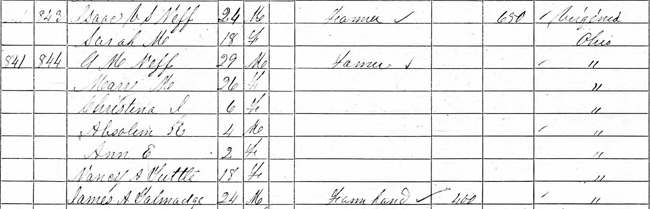
Because I know a lot about the Maddox family, I noticed a very important clue in the 1860 census. The farmhand that was living in Mary's household was related to Mary through the marriage of yet another brother. It could have been coincidence, but it turned out that this clue helped keep me focused on the right family.
Learn about your ancestor's Family, Friends, Associates and Neighbors. Sometimes you can't find your ancestor, but you might find a member of their FAN club to lead you to the poorly written or badly indexed record of your ancestor.
Specific to researchers of the Maddox and Neff families of Pickaway County, Ohio, here's another look at the 1860 census for George M and Mary Maddox Neff.
Notice the farmhand, James A Talmadge. Mary's brother David married Mary Mariah Tammadge, the older sister of James. The spelling of the name varied between Tammadge and Talmadge, depending on the record. Based on the 1850 census, the two were siblings, children of Henry Talmadge.
Labels:
Maddox,
Neff,
Pickaway County OH,
Search Strategies
Tuesday, July 19, 2016
Mary's Husband Served His Country
Continuing with search strategies, let's learn more about Mary. Today's tip is to collect every military record (and every record of any type) you can find on your subject and their immediate family. Each record provides different clues.
I was still looking for what happened to Mary Maddox Neff of Pickaway County, Ohio, after the 1860 census. I'd been looking for Mary for over 10 years, so knew more than names, but not enough. Some of the questions I pondered were:
- Had I located the right family in the 1860 census? The names George and Mary Neff were not a unique combination.
- Was she married to the George M Neff who served in Company G, 113th Infantry Regiment, Ohio, during the Civil War?
- Did her George possibly die during or after the War?
- If George died, did Mary remarry?
- Did George or Mary collect a Civil War pension?
Military records can be a gold mine of information and should always be collected when available. Pension files are frequently rich in genealogical information. By learning the available records, you'll know what to look for. I wanted to find any Civil War pensions for this couple.
Remember to use Ancestry Categories and Family Search Collections to go straight to military records. Fold 3, which is another Ancestry-owned site, has some military records that are not available elsewhere.
Searching on George M Neff who served from Ohio gives a reasonable number of Civil War records to review, but there were no pension files.
One of the problems with filters is that not every record set is tied to dates and locations. You can miss a record by setting the wrong filter. Experiment with filters to see what is returned with different settings.
In this case, limiting the Military service location to exactly Ohio was the wrong strategy. I had to change that filter to be broad, rather than exact. That basically removed the filter, but would prioritize Ohio records, if the location had been used.
By removing the Ohio limitation, there are 59 pension files of possible interest. These images are only index cards, but they are good clues. Clicking into the pensions, then adding a spouse with the name Mary prioritizes the search results.
The very first result happens to be the Ohio soldier I'm looking for, but the pension was filed from Iowa, an unexpected location. Here are some new clues. Now I know that the soldier George M Neff was indeed married to a woman named Mary. I still have to determine if it is the right Mary. Did my couple move to Iowa?
The card from Ancestry is hard to read. What could I learn at Fold 3? Is the complete pension file available? Remember to use every site you can to collect records. Fold 3 had a different view, but not the complete file.
What do these cards reveal?
George M Neff applied for a pension from Iowa on May 22, 1890, and he was approved. He died on October 6, 1897. His widow, Mary M Neff applied in October, 1897, for a widow's pension and she was approved. Her death date is not recorded in the index, but would be in her pension file.
The Civil War pension index cards were the breakthrough in my search for Mary.
Labels:
Ancestry,
Family Search,
Fold 3,
Maddox,
Neff,
Pickaway County OH,
Search Strategies
Monday, July 18, 2016
Correcting Mary's Family
Yesterday my friend Elizabeth shared her tale of search woe in the comments. She found the elusive census record after trying every trick she had. And I found my Mary Maddox Neff after trying a number of tricks, too. Having found those difficult records, we really need to leave breadcrumbs for the next searcher.
Ancestry and some other sites give us the ability to add corrections or additional information for some, but not all, of the information in a record. When we finish our happy dance, we need to take a few minutes to provide that correction. Our children, grandchildren, nieces, nephews and cousins will appreciate the help when they are searching.
Today I'll show you how to view Ancestry corrections and how to make them yourself. I hope you already do that and can just ignore this post.
Let's return to Absalom Neff, born in Ohio, indexed in the 1870 census. Here are the two results.
Notice the pencil after Absolam Loff who is living in Van Buren County, Iowa. That shows that there is a correction or edit to the record that was indexed by Ancestry. Otherwise I'd be wondering how Loff related to Neff. I have to click into View Record (not the image) to see the correction and who made it.
The record was indexed by an Ancestry transcriber as Absolam Loff. Under that name the brackets show the correction (or additional information) is the name Absolam Neff. Click that name to see information about the correction.
I contributed this correction to the name, stating it was a transcription error. I see the trash can only because this is my correction and I can choose to delete it.
Truth be told, the record is nearly impossible to read. Thank goodness for Absalom!
When adding a correction, we can go beyond errors and add some clarifications. I had already added the surname correction, but I could certainly add clarity on the first names. These initials are not at all helpful. Let's fix up his older sister. Still in the text view for Absalom, I clicked on C J Loff, which is one line up.
From this page, I clicked on View/Add alternate info. It brought up a corrections window just like the one for Absalom, above.
I then clicked on the button "ADD YOUR OWN". Now I can add information for Christina.
In this case, I want to add a variation of her name. I use the drop down arrows to see my choices and variation was the best fit. I have to type in the name as it should be. The explanation is optional, but as this is not a transcription error, adding a brief explanation helps the Ancestry reviewer as well as future researchers.
After clicking on "SUBMIT ALTERNATE", one more window comes up because I changed her surname.
I am asked whether to apply the surname change to everyone in the household. You'll want to choose wisely between APPLY and Close when making such a change. When I first submitted the Neff surname last year as a transcription error, I used APPLY, as that specific transcription error does apply to everyone in the household.
In this case, I did not need to repeat the surname change and the information I added is specific to Christina. I clicked on Close.
I can see the corrections that I just made, but no one else can see them until they have been reviewed and accepted by someone at Ancestry. Here's a final look at how Christina's corrections appear.
Today I added a first name for each person in the household, except Absalom. I added brief additional information from the 1880 census and from George's military records to explain the variations for George M, Ann Elizabeth and Laura.
Mary and her family are now all corrected and augmented in the 1870 census index. I'll share more search strategy the next time.
Labels:
Ancestry,
Maddox,
Neff,
Pickaway County OH,
Search Strategies,
Van Buren County IA
Sunday, July 17, 2016
Mary Had a Little ... Child
Today I have another tip to help speed up searching for online genealogy records.
In yesterday's tip, I was searching for Mary Maddox Neff and used Ancestry Categories and Family Search Collections to focus the search.
Today I've narrowed the Ancestry search by filters, which is a topic for another day. Unfortunately even searching for Mary Neff, born in Ohio, there are over 100 results in the 1870 federal census, according to Ancestry.
I could add a birth year, but this family tended to be sloppy on ages. That's actually a common issue, but I would include it in the filtering to start. It wasn't helping with Mary.
What else do I know about Mary to help narrow the search? The 1860 census of Pickaway County, Ohio, shows her family members.
I know her husband is George M. How many results are there in the 1870 census for George Neff, born in Ohio?
A count of 44 is more workable. But what about the children? Ann is a very common name, but there are two other children.
The tip of the day is to search with the less common names in the family. Just because Mary Maddox Neff is the person I am searching for, I should not limit myself to searching for her name. This strategy works on Family Search as well as Ancestry and on many other sites.
Mary's children's names are the ones to search. Absalom is the obvious choice with two matches. Remember that names were fluid before birth certificates. If I were named Absalom, I would definitely drop that name at some point. He might have already started using another name by the age of 14.
Christina is also a good name to try. Since Christina was 6 in 1860, she would be about 16 in 1870, which is of marriageable age. She might be gone from the household, but it is worth looking at each of the four matches.
I didn't find the family with this tip, though today you would do so. One of the two matches on Absalom is correct, but only because I submitted a correction after digging up the record.
Labels:
Ancestry,
Family Search,
Maddox,
Neff,
Pickaway County OH,
Search Strategies
Saturday, July 16, 2016
All About Mary
Every once in a while someone asks me how I found some information. That question came to me again recently and I wrote a rather lengthy reply to a newbie. My methods are not special, but they are deliberate. Today I share my single biggest secret.
A columnist -- online or paper -- once wrote that Ancestry is a scam. I wouldn't go that far, but it is important to know what they want from you: your data first and your money second. If you depend on their online service to store your family tree, they have achieved the first and are also doing well at keeping their hand in your pocket.
Web sites, not just Ancestry, want you to spend long periods of time on their sites. The longer you stay, the more ads you will see and the more money you will spend. So how do you spend less time at Ancestry and find more of what you are looking for? The strategy I'll show you also works for Family Search.
Where's Mary?
Last year I was searching for a woman named Mary Maddox Neff. I had last found her with her husband and children in the 1860 census in Pickaway County, Ohio. What happened to Mary Neff after 1860? Let's search both Ancestry and Family Search for this fairly common name.
Focus on Ancestry Categories
First let's do a wide-open search on Ancestry.
If you have not changed your default results method, this would be the view you get. 986 thousand results to dig through. I'd be on the Ancestry site the rest of my life looking for that 1870 census. Ka-ching!
Narrow the collection to United States only, since that is where Mary should be.
Now it's only 864 thousand results. I could continue to refine the filters, but there is a very fast way to focus. Choose Categories instead of Records at the top right. That's the trick. It's that simple.
Notice that the matching result count went up to over one million. That's strange, but now I don't care because I am not going to look at those matches. Having selected Categories, now my results will always return as Categories and I don't have to switch it unless I'm feeling masochistic.
Next I have to think about what I need to find. In this case I want the 1870 census. So I would click into the line that says "See all 114,048 results" that is under Census & Voter Lists. The 1870 census will be in that list and I will select that census and start working with filters to find what I want.
The downside to this method is that you have to think about the records you need to search. The upside is you will get to know the record types and be able to get to what you want much more quickly. So in the long run there is no real downside. And Ancestry may not keep you spending money quite so long.
Focus on Family Search Collections
Family Search works in a similar way. First the wide-open search returns 61 thousand results. Even on a free site, that's far too many records to look at.
On Family Search, click on the word Collections at the top of the results to break the results down by
type.
Again, looking for the 1870 census, I need to click on "Show All 101" after the heading that says Census & Lists.
I didn't find Mary Neff in the 1870 census by these methods alone, but that's a tale for another day.
Labels:
Ancestry,
Family Search,
Maddox,
Neff,
Pickaway County OH,
Search Strategies
Subscribe to:
Posts (Atom)